Previewing as Staff — this is what a Staff account sees.
Poker Tournament Ops

Sign in to continue

This page looks like it's open inside another app's built-in browser, where Google sign-in often doesn't work. If "Continue with Google" fails, open this page in Chrome or Safari instead (tap the ⋮ or share icon and choose "Open in browser"), or just use email sign-in below.

or use email

If you've opened an invite link from your company, this joins their team with Staff access — enough to sign in and apply for open shifts. Otherwise you'll be asked to set up your own company as its Owner.

Set up your company

You're signed in, but not part of a company yet. Create your own to get started — you'll be its Owner, with your own schedules, games and staff, completely separate from anyone else on this platform.

Joining an existing company instead? Ask its Owner for an invite link — opening it will add you to their team automatically.

Trial terms & privacy

Version 2026-10-v1Draft: pending legal review

These are the plain-English terms for trying Poker Tournament Ops (“PTO”, “we”) for free. By creating a company you accept them on behalf of that company.

1. What the trial is

PTO is software for building tournament schedules, staffing them, tracking hours, invoicing venues and scoring leagues. The trial is free. It runs until we tell you it is ending, and we will give you at least 14 days’ notice. Taking part doesn’t commit you to anything.

2. It’s still being built

PTO is a work in progress. Features will change, and there will be bugs. We don’t promise it will always be available. Keep your own copy of anything important, such as a roster for a big event or an invoice you’re about to send, and check it before you rely on it.

3. Your information

  • What you put into PTO stays yours. We use it only to run the service for you, and we don’t sell it.
  • PTO stores personal information such as names, email addresses, shift and timesheet records, and (for staff who invoice) ABNs and bank details. Access is limited by role, and each company’s information is kept separate from every other company’s.
  • The company owner is responsible for the staff details they add and for letting their staff know how that information is used.
  • You can ask us to export or delete your company’s information at any time. When the trial ends we will offer you an export, and keep your information for 30 days before deleting it unless you continue with a paid plan.
  • We handle personal information with care and in line with Australian privacy law.

4. Not professional advice

The GST, hours and invoice calculations are tools to save you time. They aren’t tax, payroll or legal advice. Your accountant or adviser should check anything that matters. Meeting award, pay and tax obligations remains your responsibility. Invoices are sent from your own email app, not from PTO.

5. Your responsibilities

  • The person who creates the company confirms they have authority to accept these terms for the business.
  • Keep your sign-in secure, and keep the information you enter accurate.
  • Use PTO lawfully and don’t misuse it or try to access another company’s information.

6. Limits on our responsibility

Because the trial is free and still in development, we provide it “as is”. To the extent the law allows, we aren’t liable for indirect or consequential loss, such as lost revenue, a missed shift or a wrong invoice. Nothing in these terms removes any right you have under the Australian Consumer Law that can’t legally be excluded.

7. Ending

You can stop using PTO at any time. We can end or suspend access if these terms are broken or the service is misused, and we’ll tell you why where we can.

8. Paid plans and changes

We plan to introduce paid subscriptions. They will come with their own terms, which you’ll be asked to accept before any charge. We may update these terms, and when we do you’ll see the new version and be asked to accept it.

9. Governing law

These terms are governed by the laws of Queensland, Australia.

You're offline. Changes are kept on this device and sync when you're back online — booking or leaving shifts needs a connection.

Team & access

Anyone who opens this link and signs up joins as Staff. Tap "New link" any time to cancel the old one.

Preview as Staff

See exactly what a Staff account sees — Find My Shift only, no Builder, Compare or Branding — without signing up a second account or leaving yours.

Poker Tournament Ops

A great poker event starts with great operations

Build your tournament schedules, staff them, track the hours, invoice your venues and score your leagues. Dealers, bar staff, chip runners, tournament directors, media and live stream are all booked straight from the schedule you build.

Built by poker operators, for poker operators

Schedule Builder Staffing & Bookings Table Management Table Tools Timesheets Invoices Staffing Analytics CasinoWare Tools
Desktop, tablet and phone

One system on every screen at the venue

Build the schedule on a desktop, run the dealer swing from a tablet and keep the shot clock on a phone at the table. It is the same Poker Tournament Ops on each one, installed from the browser.

pokertournamentops.com
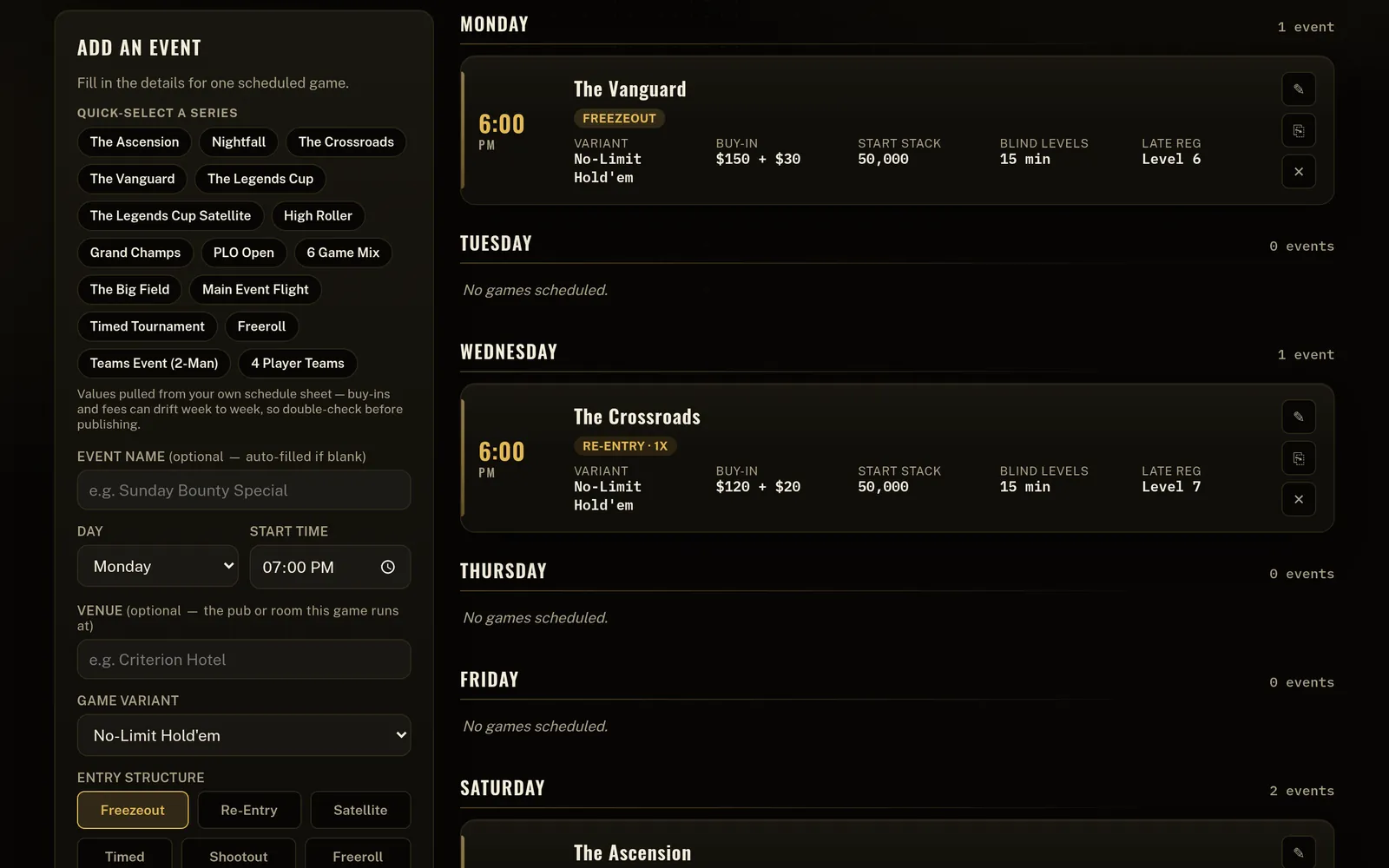
Schedule Builder on a desktop: the add-an-event panel beside a week of games, each with its time, buy-in, starting stack, blind levels and late registration
Desktop Schedule Builder
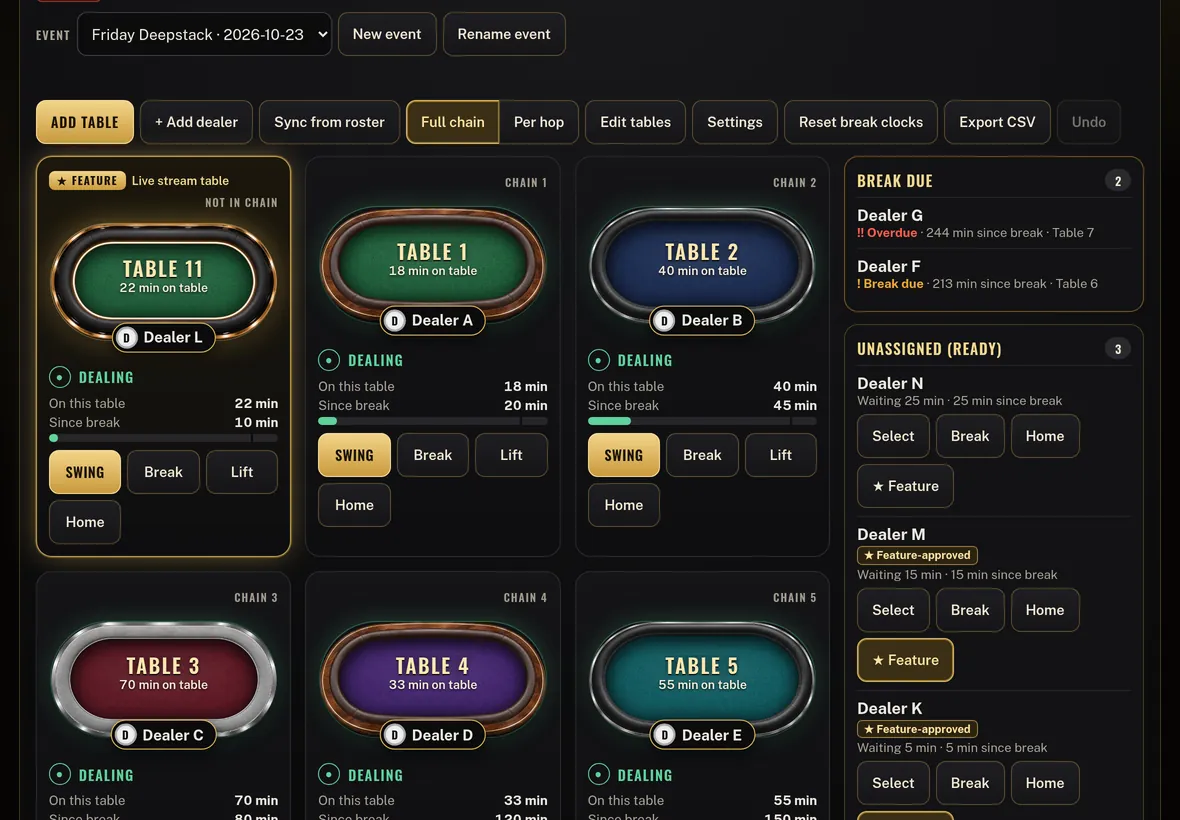
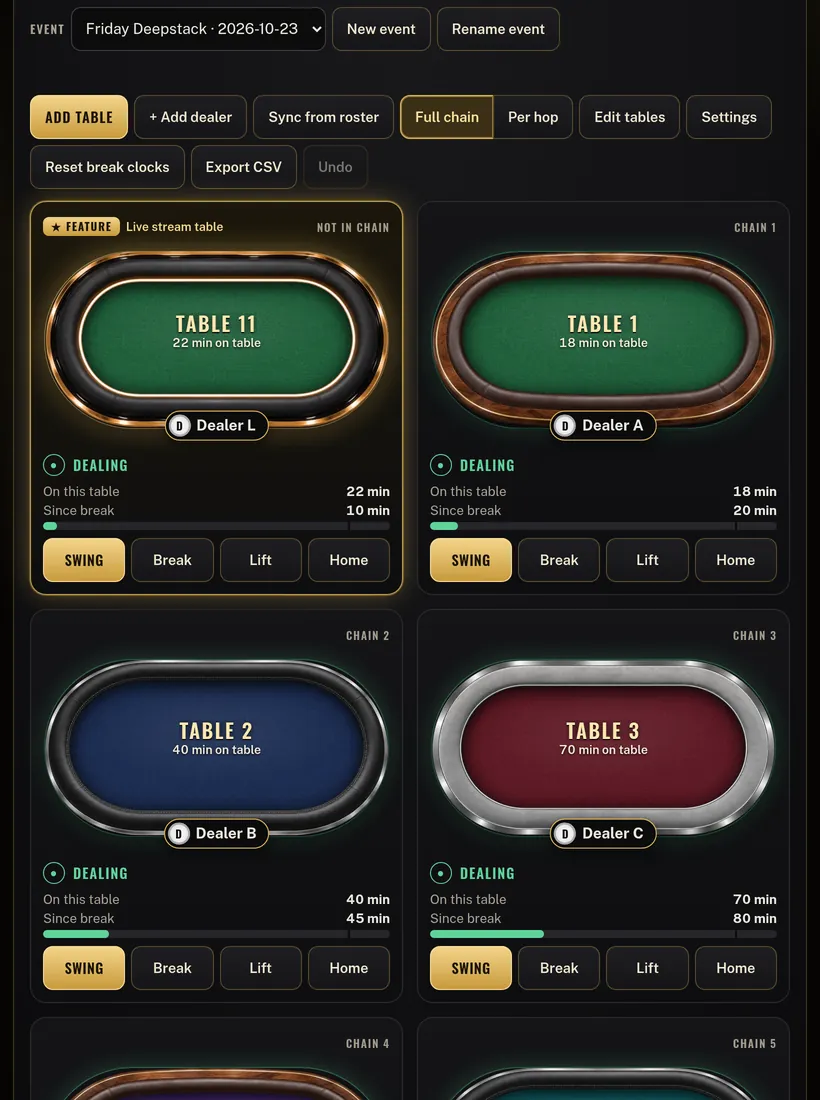
Table Management on a tablet: the dealer swing board showing each table's dealer, minutes on the table, and who is due a break
Tablet Table Management
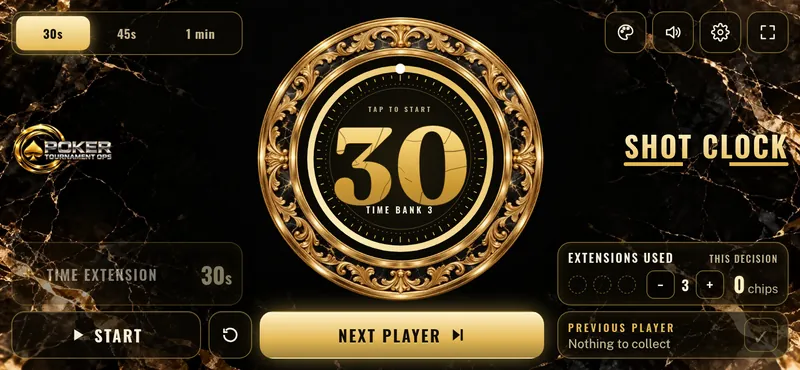
Shot Clock on a phone lying flat on the table, set to 30 seconds
Phone Shot Clock

Real Poker Tournament Ops screens. The schedules, tables and dealers shown are sample data.

Before the event

Build the schedule once

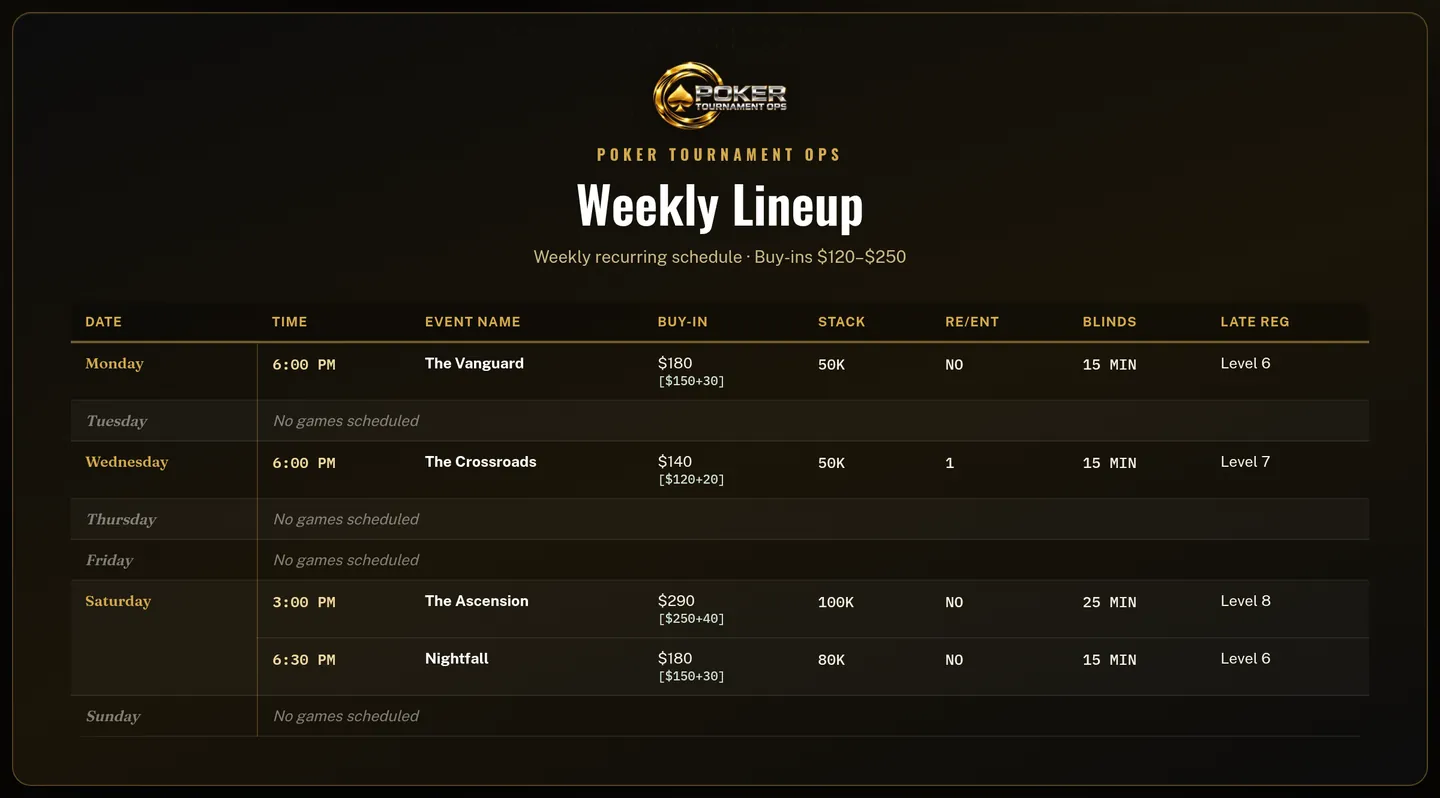
Daily, weekly, monthly and festival schedules, built from the full PTO game list. Every event carries its buy-in, starting stack, blind levels and late registration, and the same schedule turns into a wall poster or by-day cards for socials.

pokertournamentops.com
Poster preview of a weekly lineup: each day's games with time, buy-in, stack, re-entry, blinds and late registration
Desktop Poster preview
Dealers♠︎Chip Runners♦︎Tournament Directors♣︎Bar♥︎Media♠︎Live Stream♦︎Timesheets♣︎Invoices♥︎GST & ABN♠︎Leagues & Player of the Series♦︎ Dealers♠︎Chip Runners♦︎Tournament Directors♣︎Bar♥︎Media♠︎Live Stream♦︎Timesheets♣︎Invoices♥︎GST & ABN♠︎Leagues & Player of the Series♦︎
Staffing it

Your crew's shifts, in their pocket

Every schedule you build turns straight into bookable shifts. Dealers, chip runners and tournament directors get a shift per event as the day grows. Bar, media and live stream get one coverage block per day. Your team installs the app, finds their shift, books themselves on and clocks in on the floor, and gets an alert the moment a shift opens or an application is approved.

  • Apply for open shifts from your phone
  • Clock in and out from the floor
  • Hours, approvals and invoices in one place
iPhone · Android · Desktop
Timesheets
This fortnight18.5 hApproved
Mon · The Vanguard6.0 h
Wed · Nightfall5.5 h
Sat · High Roller7.0 h
INV-0007Sent$647.50
My shiftsExample
Mon 12Tue 13Wed 14Fri 16
DealerThe Vanguard6:00 PMBooked
Tournament DirectorThe Crossroads6:00 PMOpen · Apply
Chip RunnerFri Night6:30 PMOpen · Apply
BarHigh Roller4:00 PMOpen · Apply
Clock in · The Vanguard
●New shift open
Dealer · Sat High Roller
On the night

Run the dealer swing from any tablet

Table Management is the swing board for the floor. Every table shows who is dealing, minutes on the table and minutes since a break. Beside the tables, dealers are sorted into break due, ready, on break, starting later and gone home. Feature tables can sit outside the chain. At the end of the night it adds up every dealer’s hours and cost and sends the hours to Timesheets for approval.

For owners, managers and approvers. Everyone running the floor sees the same board, live.

Table Management on a tablet held upright: a feature table and numbered tables, each with its dealer, minutes on the table, minutes since break and Swing, Break, Lift and Home buttons
Tablet Table Management
At the table

A shot clock and mixed game cards

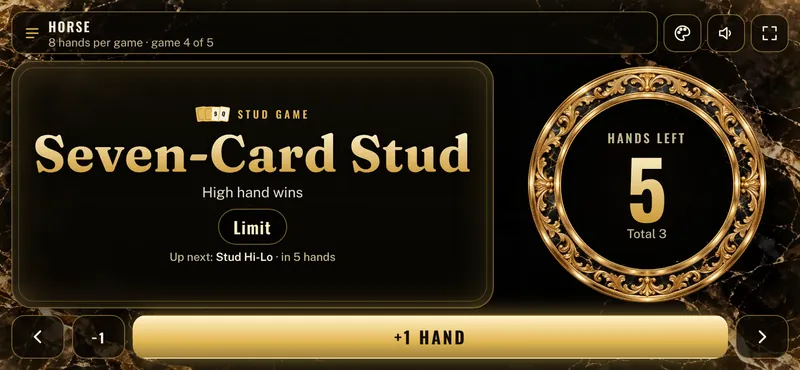
Table Tools turns the dealer's own phone into a shot clock with 30, 45 and 60 second options, or a mixed game table card. Pick HORSE, 8-Game or a rotation you build, and the card shows the game in play, the hands left and what comes next. Both are built to lie flat on the table, sideways, where every player can see them.

For every dealer on your team. Clock and card settings stay on that phone.

Shot Clock on a phone lying flat on the table: a 30 second clock with time extensions, chips and the Next Player button
Phone Shot Clock
Mixed game table card on a phone lying flat: game 4 of 5 in a HORSE rotation, Seven-Card Stud in play with 5 hands left and Stud Hi-Lo up next
Phone Mixed game cards
After the night

Hours, invoices and the staffing numbers

Across the season

Turn league rules into a CasinoWare formula

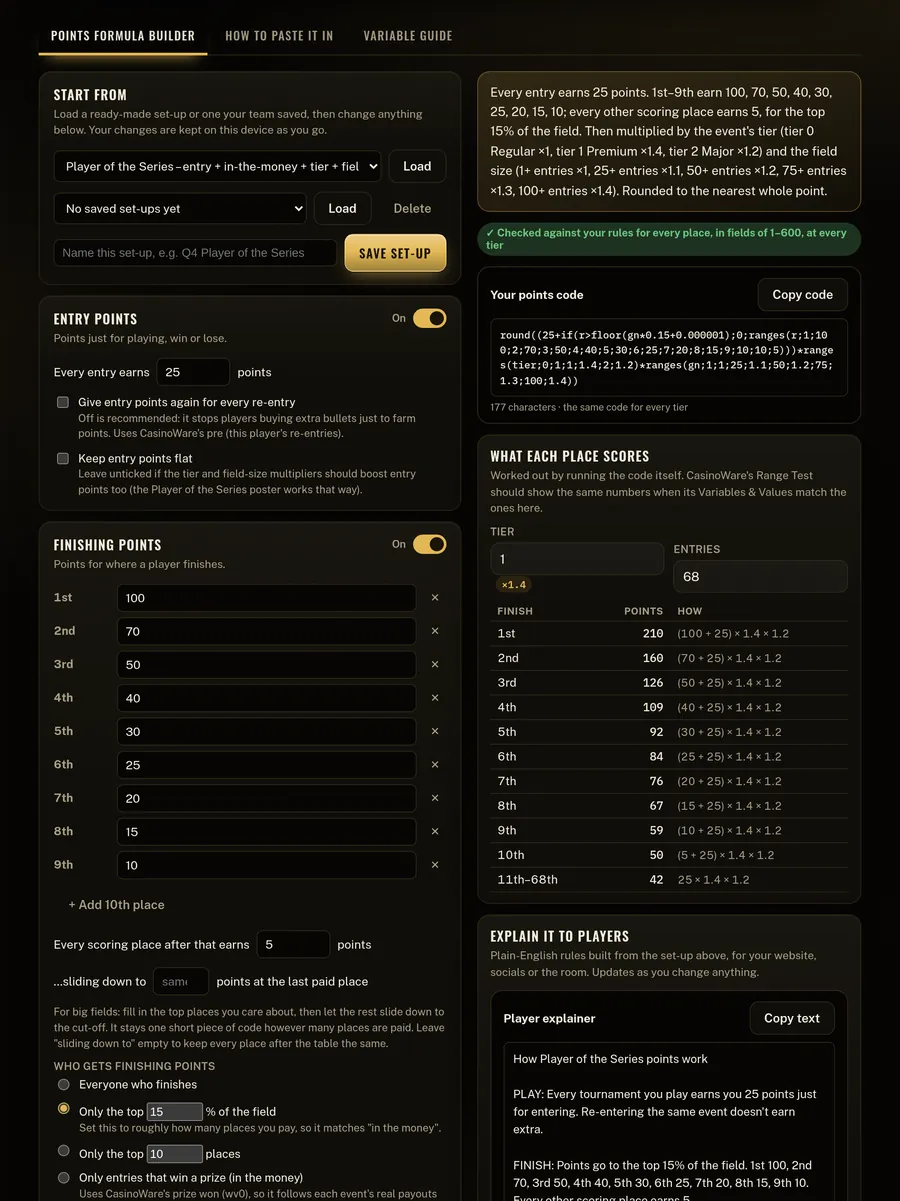
CasinoWare Tools takes your league or Player of the Series rules, written in plain English, and gives you the exact formula CasinoWare's Formula Editor needs. Set entry points, finishing points, tiers and field size, check what every place scores, then copy the code and a plain-English explainer for your players.

CasinoWare Tools on a tablet: Player of the Series points rules, the generated formula code and a table of what each place scores
Tablet CasinoWare Tools

Your schedules

Take it to the floor

Install Poker Tournament Ops on your phone in seconds. No app store needed.

iPhone · Android · Desktop
Poker Tournament Ops

A great poker event starts with great operations

© 2026 Poker Tournament Ops. All rights reserved. ·

Poker Tournament Ops

Staffing & Bookings

Shifts are generated from a schedule's events and days. Dealers, chip runners and tournament directors get their own shift per event; bar, media and live stream get one coverage block per day.

Turn on notifications so you know the moment a shift opens up — or the moment one of your applications gets approved.

You're viewing shifts as a guest — to apply for one.

Poker Tournament Ops

Table Tools

Tools for running the table from your own phone or tablet. Everything here works on this device and saves on this device.

Dealer control · one tap per extension

Extensions usedChips

This decision
3
0chips

Previous player

Nothing to collect

Poker Tournament Ops

Table Management

Floor management control for owners, managers and approvers. One shared board, live on every device they use.

Poker Tournament Ops

Timesheets

Clock in and out of the shifts you're booked on — a manager reviews and approves the hours before they're final.

Record payment

Add timesheet entry

Poker Tournament Ops

Staffing Analytics

Track tables and players remaining against how many dealers you actually have on, so staffing scales down with the tournament instead of sitting flat all day.

Invoices

Make, send and track invoices. Owners invoice clubs and pubs; staff who work under an ABN can invoice for their shifts.

Private · Empire Poker only

Competitor Intelligence

What Queensland's poker venues are charging, running and paying out — refreshed every morning from their public websites, Facebook posts and ad libraries. Every figure links to where it came from; anything unpublished shows as not found.

Poker Tournament Ops

CasinoWare Tools

Pick how your league or Player of the Series scores in plain English, and get the exact code to paste into CasinoWare's Formula Editor. No formula writing needed.

Poker Tournament Ops

Schedule Builder

Build daily, weekly, and festival tournament schedules from the full Poker Tournament Ops game list, then preview the whole thing as a full wall-schedule table — just like your printed posters — or as by-day cards for socials.

Compare & merge

Pick everyone's suggested schedules of the same type, then copy the events you agree on across into one final schedule.

Final schedule preview

Your branding

Set your venue's name, logo and colour — they show on your printed poster and schedule, right alongside your tournament names. Poker Tournament Ops is the tool itself, and always stays Poker Tournament Ops.

#E3B854
Logo preview
Your venue name
On your poster and schedule

Turn this into artwork

This tool can't call an image AI directly, but here's a ready-made brief — paste it into your AI agent (with image generation on) or another AI image tool to get a poster design in your venue's own branding, built from your actual schedule.

You haven't set up your venue branding yet — first so the artwork comes out looking like yours, not generic.

AI image tools sometimes misspell or garble text baked into the picture — always check the generated poster's times, prices and game names against the real schedule before you send it out.

Create a schedule

0Events
0Variants running
—Buy-in range

Add an event

Fill in the details for one scheduled game.

Quick-select a series

Values pulled from your own schedule sheet — buy-ins and fees can drift week to week, so double-check before publishing.

Entry structure
Bounty

Dealing

Entry is free. If rebuys are offered once a player busts, set how many below and the rebuy cost as the fee — the buy-in itself stays $0.

Plays to a fixed clock, not to a last player standing. Registration and re-entry close at the end of a set level, then remaining stacks are counted and prizes paid on chip count.

Buy-in tiers
Tier 1
Tier 2
Tier 3
Side-game format (optional)

For a cash-game-style special played into or alongside the timed clock.

Survivors advance to the next stage carrying a chip stack scaled to where they finished — the winner brings the most, the last qualifier brings the least. Note how many advance from this round in the notes field, since that depends on how many teams/players enter.

This preview is styled for a social post or website schedule graphic — screenshot it, or use "Turn into artwork" to get a ready-made prompt for your AI agent or another AI image tool.

No schedules yet. Click "+ New schedule" to start a daily, weekly, or festival lineup.

Get the app

Add Poker Tournament Ops to your home screen so it opens like a real app — no App Store, nothing to install from anywhere else.

Do you already have it on your home screen?

You're all set — look for the icon on your home screen. If notifications aren't on yet, tap "Enable shift alerts" back on the Staffing page.